SKU: 81103572844

Spider Farmer GGS AC5 Power Strip – 5 Smart Outlets for Climate & Device Control

Sale price$80.99 Regular price$89.99
Save 10%

Pay in installments of $22.50 with ShopPay, AfterPay and Klarna

Shipping Estimate
USA
  • USA
  • CAN

Ships within 48 hours · Estimated delivery Aug 13 - Aug 18

Promo Codes Available:

For Your Every Summer RSVP, with Code: SUMMER15

Description

Spider Farmer GGS AC5 Power Strip – 5 Smart Outlets for Climate & Device ControlSmart Power Strip with WiFi, Bluetooth & Environmental Automation Take full control of your growing environment with this advanced smart power strip. Built for precision growers, it delivers complete automation through 5 independently controlled outlets, real time environmental monitoring, and seamless app integration. Whether youre powering lights, fans, or climate devices the GGS AC5 makes management effortless. Quick Glance Benefits 5 Smart Outlets

Smart Power Strip with WiFi, Bluetooth & Environmental Automation

Take full control of your growing environment with this advanced smart power strip. Built for precision growers, it delivers complete automation through 5 independently controlled outlets, real-time environmental monitoring, and seamless app integration. Whether you’re powering lights, fans, or climate devices — the GGS AC5 makes management effortless.


✅ Quick-Glance Benefits

🔌
5 Smart Outlets
Control up to five devices independently for total flexibility.
🌡️
Environmental Automation
Automates heaters, humidifiers, dehumidifiers, and supplemental lighting.
📱
App Connectivity
Manage everything remotely with Spider Farmer app via WiFi & Bluetooth.
🌱
3-in-1 Soil Sensor
Monitors soil moisture, EC, and temperature to guide watering and feeding.
🚚
Fast, Free U.S. Shipping
Quick delivery direct from U.S. warehouses.


What’s Included

  • 1x GGS AC5 Power Strip

  • 1x Temperature, Humidity & Light Sensor

  • 1x 3-in-1 Soil Sensor

  • 1x 2-in-1 Adapter (for connecting lights to controller)

  • 7x RJ12 Cables (2.5m)

  • 2x RJ12 Cables (0.25m)

  • 3x RJ12 Telephone Line Splitters

  • 6x Hook & Loop Straps


Use It For

✔️ Smart climate automation
✔️ Powering multiple grow devices
✔️ Soil moisture & nutrient monitoring
✔️ Scheduling lights & fans


🔍 Standout Features

Independent Outlet Control
Each of the five outlets can be scheduled or automated separately.
📊
Data Tracking
Log and analyze temperature, humidity, VPD, and soil data inside the app.
🌬️
Fan Integration
RJ12 fans gain precise speed & oscillation control; non-RJ12 fans run on timed outlets.
🔗
Wide Device Support
Compatible with Spider Farmer LED lights, heaters, humidifiers, and dehumidifiers.


Ready to upgrade your grow setup?

Order the Spider Farmer GGS AC5 Power Strip today and power your grow tent with smart automation, precision sensors, and full environmental control.


Spider Farmer GGS AC5 Power Strip Specifications

  • Outlets: 5 independently controlled outlets

  • Connectivity: WiFi & Bluetooth via Spider Farmer app

  • Light Compatibility: SF (excluding SF1000D, SF300, SF600), G, and SE Series

  • Fan Compatibility: RJ12 clip & inline fans (advanced controls); other fans via timed outlets

  • Supported Modes: Timer, temperature, humidity, CO₂ automation

  • Included Sensors: 3-in-1 soil sensor + temp/humidity/light sensor

  • Data Logging: Historical tracking through app


Spider Farmer GGS AC5 Power Strip Warranty

  • Manufacturer Warranty: 1 Year

  • Covers defects in materials and workmanship

  • Support handled directly through our team


FAQ

Q: Can I use the AC5 to control lights and climate devices at the same time?
A: Yes, the AC5 allows you to manage lights, heaters, humidifiers, and dehumidifiers simultaneously.

Q: Will this work with Spider Farmer SF2000 or SF4000 lights?
A: Yes, it is compatible with most SF, SE, and G Series lights (except SF1000D, SF300, and SF600).

Q: Can I still use non-RJ12 fans?
A: Yes, they can be controlled through the on/off outlet scheduling. RJ12 fans support advanced features like oscillation and standby speed.

Q: What extra sensors are available?
A: You can expand with Spider Farmer CO₂ and PAR meters for advanced monitoring.

Q: What’s included in the kit?
A: The package includes the AC5 power strip, two environmental sensors, adapters, RJ12 cables, splitters, and cable straps.


Spider Farmer App Functions and Settings

1. Download the Spider Farmer App

Search for 'Spider Farmer' on Google Play or the App Store, and download the app.


2. Language, Signup, and Bluetooth

Once you open the app, pick your language and sign up with your email. The app will then ask you to turn on Bluetooth. 


3. Finding and Identifying Your Spider Farmer Devices

3.1 Starting Device Search

  • Tap the plus icon to begin searching for nearby Spider Farmer devices.
  • Detected devices will appear in the app, and you can identify them by their icons.

3.2 Troubleshooting Device Discovery

If you can't locate your device, try the following steps based on the device type:

  • If you have a Spider Farmer AC5/AC10 Power Strip: Press and hold the Ctrl button for 3 seconds to reset Bluetooth.
  • If you have an LED Grow Light with a Digital Display: Press and hold the knob for 3 seconds, then release to restore factory settings.
  • If you have a Spider Farmer GGS Controller: Select “Restore Factory Settings” from the interface.

Note: Restoring factory settings will delete all automation schedules and user connections.

3.3 Setting Up the SF-GGS-AC5 Kit

If you’ve purchased the SF-GGS-AC5 Kit, follow these steps:

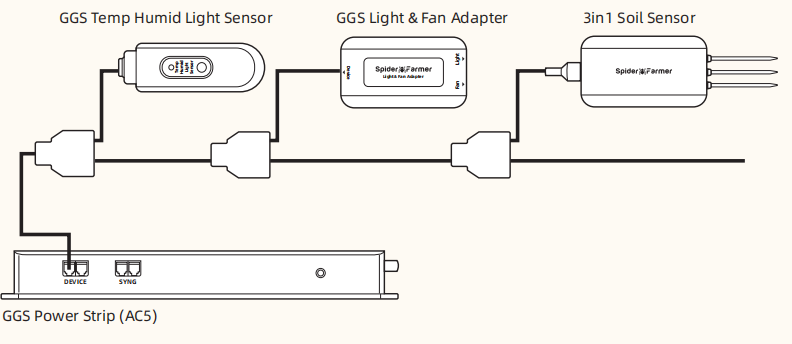
  • Use the RJ12 cable to connect devices according to the provided diagram. (If you need to control the LED grow light, the GGS 2-in-1 adapter (included in this kit) is required. You’ll need to plug the light into the “light” port on the adapter.)
  • Ensure all devices are plugged into a power source, as the RJ12 cable does not provide power. The sensor only requires the RJ12 connection.
  • Open the app, search for your devices, and tap the Power Strip icon to start the setup.  


4. What Data Can You View on the Spider Farmer App?

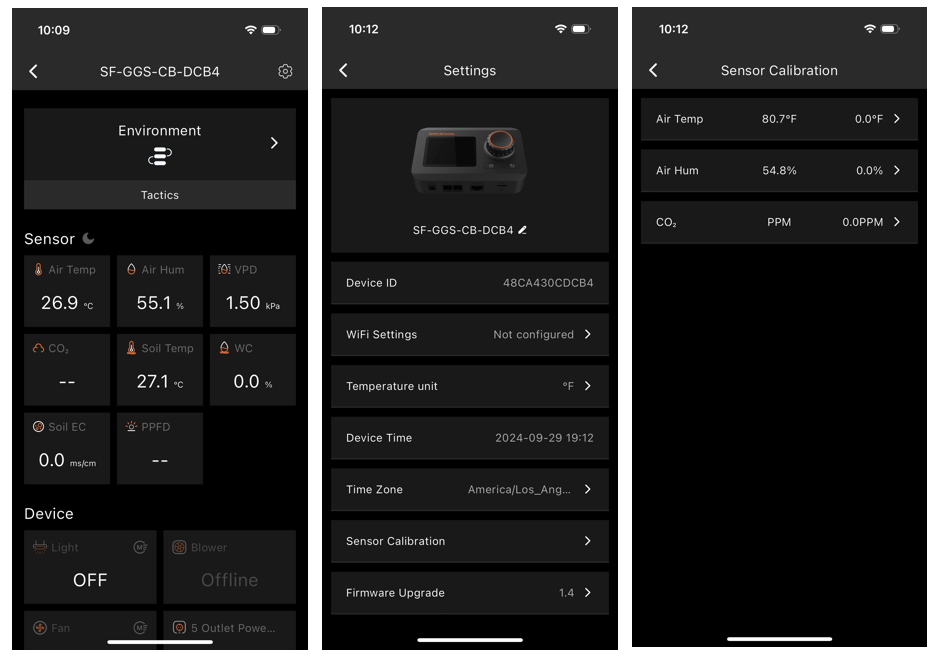
  • 4.1 Time Display:

Quickly check the current date and time in your grow room with ease.

  • 4.2 Day/Night Icon:

See at a glance if your grow tent is in its light or dark cycle. A sun icon appears when light is detected, and a moon icon shows during dark periods. This feature allows you to monitor light conditions without opening the tent. (Requires the temperature, humidity, and light sensor included in this GGS AC5 Power Strip kit)

  • 4.3 VPD and Temperature/Humidity Display:

Get precise readings for temperature, humidity, and Vapor Pressure Deficit (VPD). (Requires the temperature, humidity, and light sensor included in this GGS AC5 Power Strip kit; Tip: Place the sensor at canopy level in the center of your growing area for the most accurate readings.)

  • 4.4 Soil Data Display:

Ideal for soil growers, this display shows real-time soil temperature, moisture, and Electrical Conductivity (EC). 

  • 4.5 CO₂ Display:

(This kit doesn't include the sensor required to measure that data. Please purchase the GGS Sensor Pro Kit separately.)

  • 4.6 PPFD Display:

(This kit doesn't include the sensor required to measure that data. Please purchase the GGS Sensor Pro Kit  separately.)

  • 4.7 Sensor Placement Recommendations

5. Preparations Before Configuring Device Operations

  • 5.1 Environmental Conditions Settings

  • 5.1.1 Day/Night Cycle Optimization: Define the time range for day and night periods. The day starts from the day start time and ends at the night start time, while night starts from the night start time and ends at the day start time. If both start times are set the same, the system defaults to 24 hours of day mode.

  • 5.1.2 Environmental Conditions Settings: Set target values for temperature, humidity, and CO₂ levels for both day and night, along with the deadband range.

  • 5.1.3 Deadband Control: Maintain stability. For example, if the daytime temperature is set to 70°F with a deadband of 3°F, there is an upper and lower threshold. Cooling will activate at 73°F and stop once it reaches 70°F, while heating will activate at 67°F and stop at 70°F.

  • 5.2 Local Time Settings

  • Set your local time on the controller. This is necessary when setting operating times, such as for lights.

  • 5.3 Multi-Language Support

  • Our system offers multiple language options to ensure ease of use, including English, German, French, Spanish, Italian, and Chinese.

6. How to Control LED Grow Lights (G Series/SE Series/SF Series)

(Note: A GGS 2-in-1 Adapter is required to control LED grow lights through the GGS Power Strip. This adapter is included in the kit.)

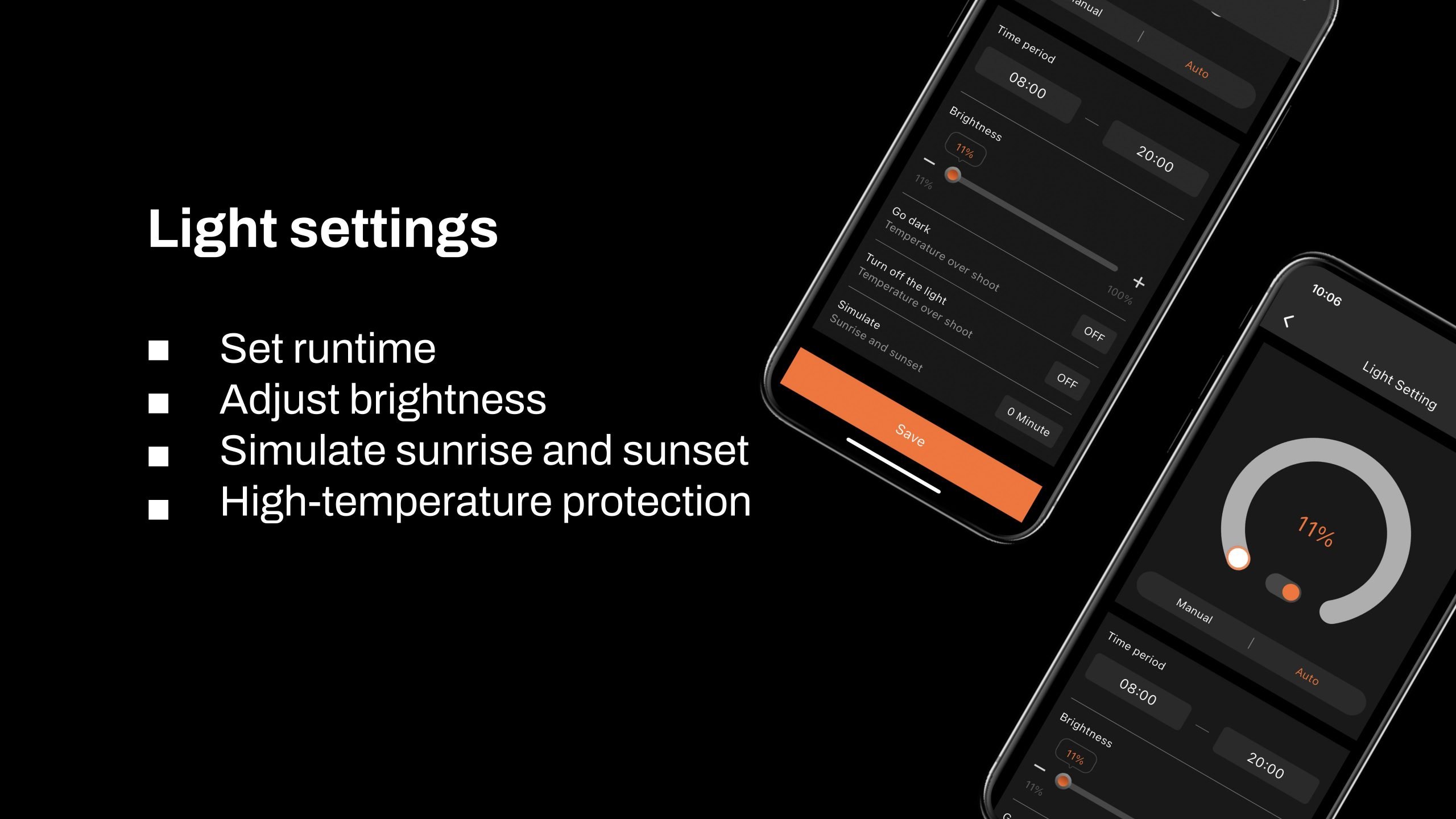
6.1 Manually Adjust Brightness for Precise Light Control:

  • Set the brightness anywhere from 10% to 100%, giving you full control over light intensity at any time. For quick shut-off, setting the brightness to 0% will turn the lights off. Any setting between 0% and 10% automatically operates at 10% brightness.

6.2 Automate Your Lighting Schedule:

  • 6.2.1 Start and End Times: Easily set specific on and off times for your lights, so your plants get consistent light cycles without manual adjustments.

  • 6.2.2 Brightness Levels: Define the exact brightness level for each cycle, ensuring your plants receive optimal light intensity.

6.3 High-Temperature Protection for Your Plants and Equipment:

  • 6.3.1 Go Dark: Set a high-temperature threshold for dimming. When the ambient temperature reaches this threshold, the lights will automatically reduce brightness to 11% to prevent overheating.

  • 6.3.2 Turn Off: Set a higher temperature threshold for complete shutdown. When this threshold is reached, the lights will automatically turn off to protect your plants and equipment.

6.4 Sunrise/Sunset Simulation:

  • Activate this feature to simulate natural light changes, with the brightness gradually increasing at sunrise and gradually decreasing at sunset.

Example: If you set the light schedule from 8:00 AM to 8:00 PM with brightness at 100% and a 30-minute sunrise/sunset setting, the lights will gradually increase from 0% to 100% brightness between 8:00 AM and 8:30 AM. In the evening, starting at 7:30 PM, the brightness will gradually decrease from 100% until the lights turn off completely at 8:00 PM.

7. How to control inline fans, clip fans, and other equipment

Key Steps in the Process:

  • If your Inline Fan or Clip Fan does not have an RJ12 port (non-latest version), the GGS series can be compatible with these Clip Fans and Inline Fans without an RJ12 port. However, only the GGS Power Strip can be used. You can plug them into the GGS Power Strip and control them separately through the outlet section in the app. (At this time, the 'Fan (Clip Fan)' and 'Blower (Inline Fan)' options under the 'Device' section will be unavailable.)

  • If your Clip Fan or Inline Fan has an RJ12 port, it will be compatible with both the Spider Farmer GGS controller and the GGS Power Strip. You can manage your Clip Fan and Inline Fan through the 'Fan (Clip Fan)' and 'Blower (Inline Fan)' options in the 'Device' section of the controller.

  • How to check if your Clip Fan or Inline Fan has an RJ12 port? If you purchased the “Experience the Latest Features - Spider Farmer GGs Controller with Next-Gen Clip Fan & Inline Fan Kits,” both the Clip Fan and Inline Fan in the kit come with an RJ12 port. If you’ve purchased a Clip Fan from us before, simply check the body of the fan for an RJ12 port. If you're buying our Clip Fan on the website now, it will definitely come with the RJ12 port. Currently, except for the kit mentioned above, all individually sold Inline Fans or Inline Fan kits do not come with an RJ12 port.

  • About using the GGS AC5 Power Strip or GGS AC10 Power Strip in combination with the GGS Controller:

  • Why Use the GGS AC5 Power Strip Along with the Controller?

  • For Those Who Prefer Traditional Control: The controller has physical buttons and knobs, making it easy for customers who prefer hands-on control without needing to rely on a smartphone. You can operate lights and the power strip just like traditional equipment, ensuring simple and reliable use.

  • Multi-User Control: The controller allows multiple users to operate the setup without each person needing their own smartphone. In a household setup, for example, anyone can quickly operate the controller, making it convenient and efficient.

  • Local Control: When the network is unstable, there’s a delay, or a phone isn’t convenient to use, the controller offers instant, local control. This option ensures smooth operation without relying on external connections.

  •  

7.1 Manual Mode vs. Auto Mode

  • Manual Mode: In this mode, you can manually turn each outlet on or off in real-time, giving you instant control over your devices.

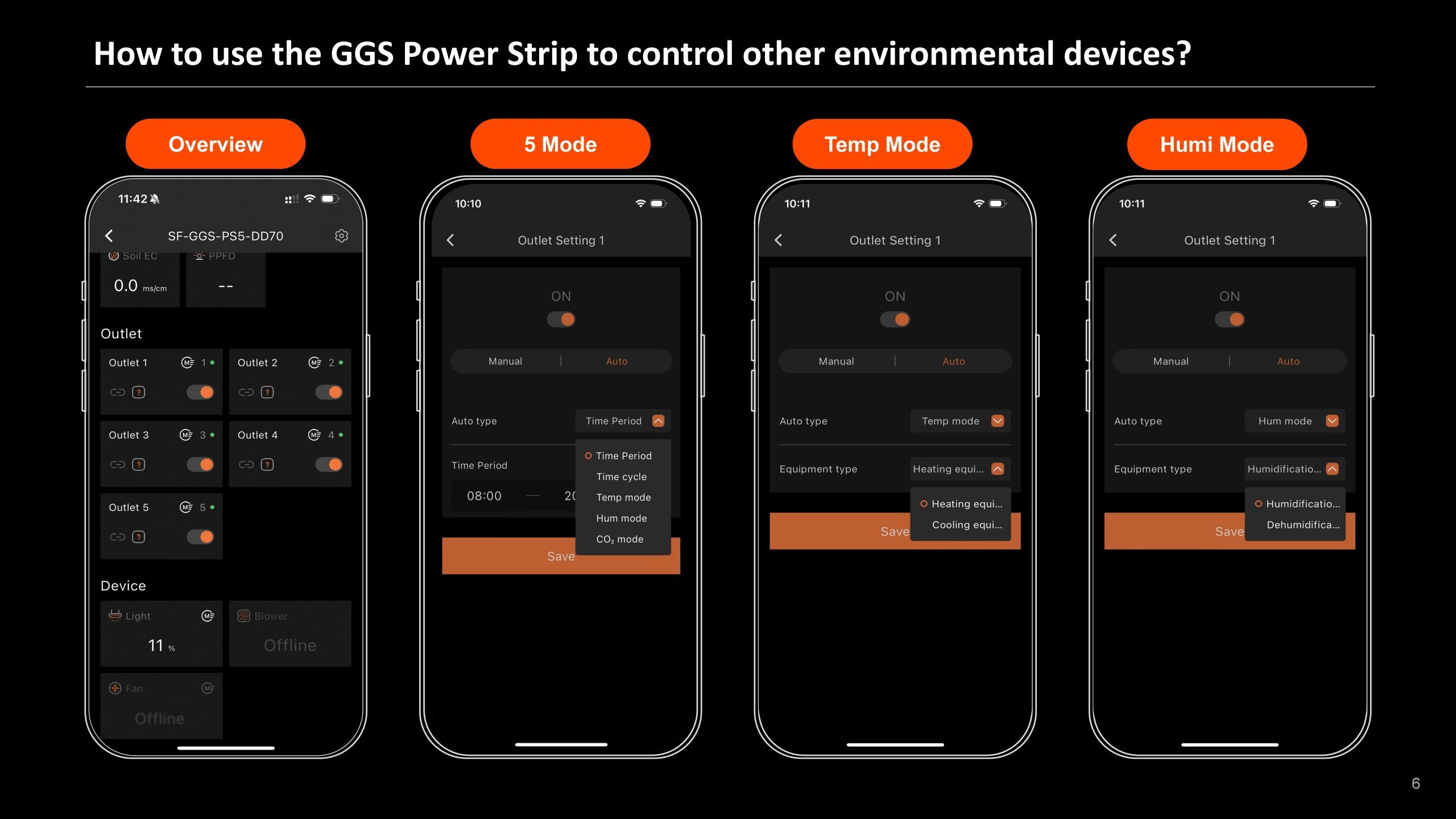
  • Auto Mode: In Auto Mode, you can set up automated controls with time periods, time cycles, temperature control, humidity control, and CO2 control for each outlet.

7.2 Auto Mode Explained

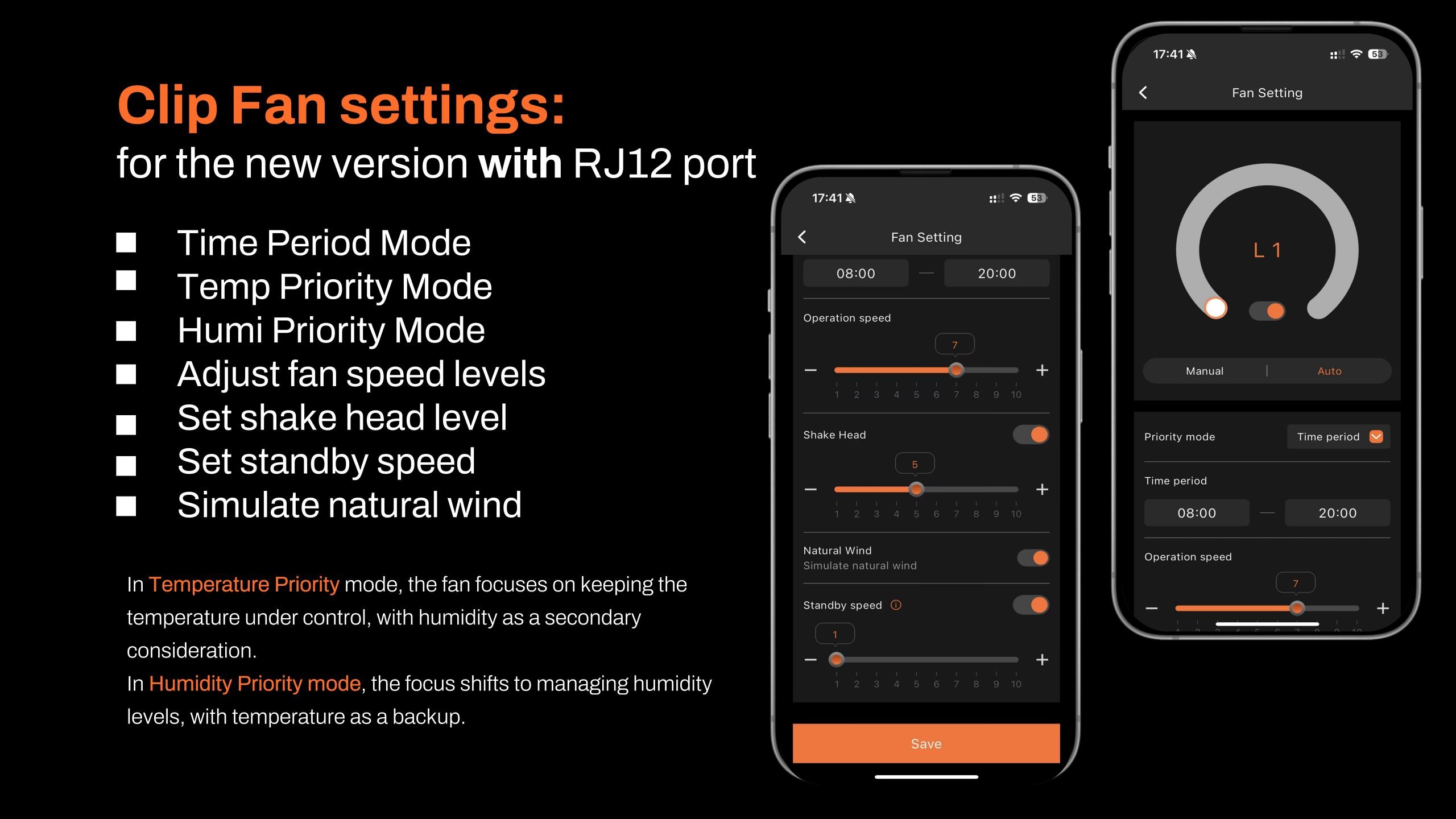
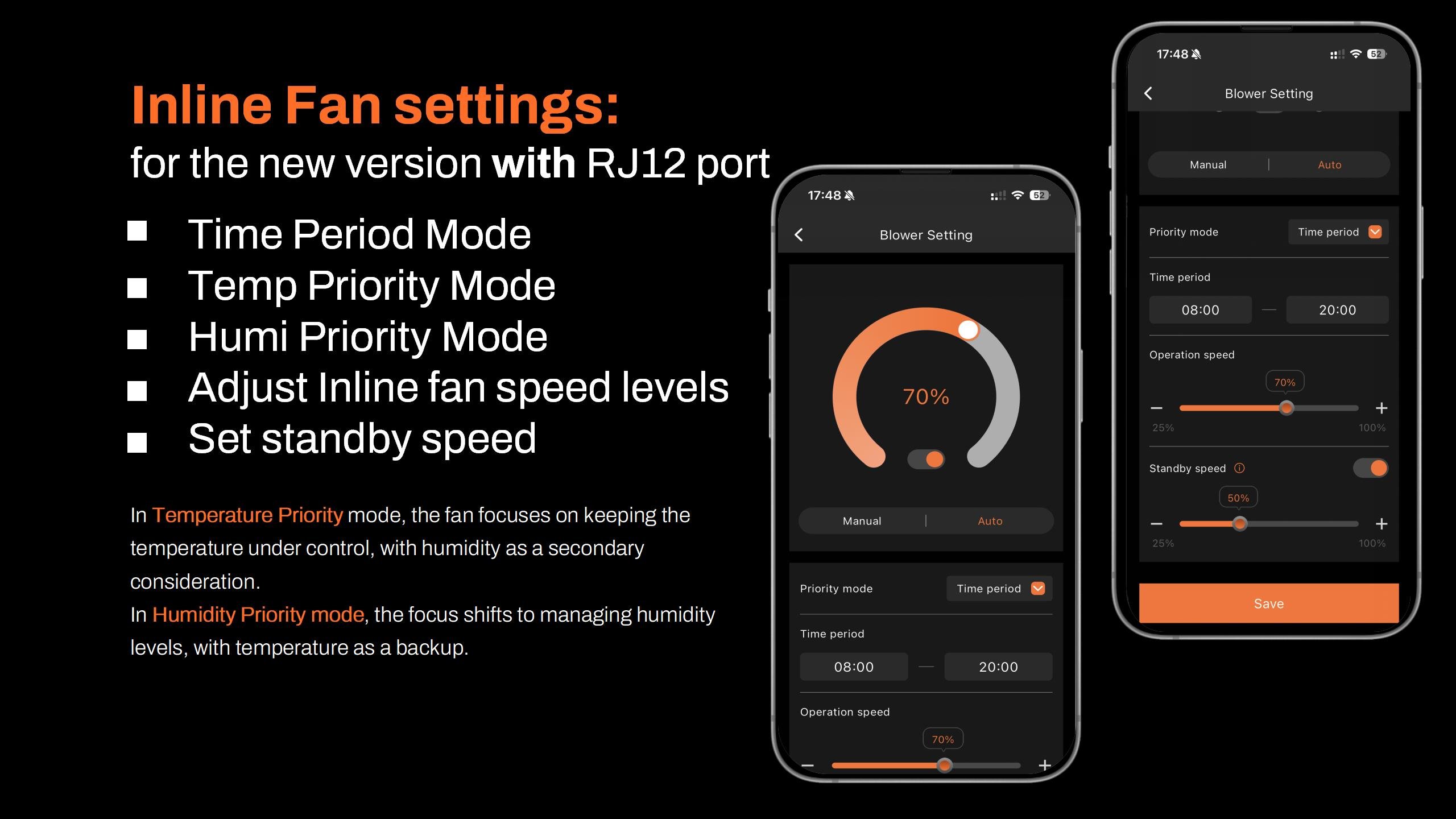
  • Time Period Mode:Set specific on/off schedules for each outlet. Choose exact times for each day of the week or create recurring daily schedules. This allows you to provide consistent light, air circulation, or other resources precisely when your plants need them.

  • Time Cycle Mode: Set power cycles to control when your devices turn on and off throughout the day. For example, you could set a fan to run for 1 hour, turn off for another hour, and repeat the cycle as needed. This is ideal for managing airflow, lighting intervals, or other timed needs in your grow room.

  • Temperature Mode:Control devices based on temperature. For example, if you plug a Clip Fan into an outlet set to Temperature Mode and specify it as a cooling device, the fan will automatically turn on when the temperature exceeds your target—keeping the environment stable without manual adjustments.

  • Humidity Mode:Easily manage humidity levels. If you connect a humidifier, set the outlet to Humidity Mode, and specify it as a humidifying device, the outlet will power on to increase humidity when levels drop below your desired range. This way, you can maintain optimal humidity for your plants without constant monitoring.

  • CO₂ Mode:Manage CO₂ levels by connecting a CO₂ device. Set the outlet to CO₂ Mode and specify whether it should add or vent CO₂. The outlet will activate based on your target CO₂ levels, giving you precise control over your grow room environment.

7.3 Important Note for Inline Fans with Digital Temp/Humidity Controller

  • When using an Inline Fan with a digital temperature and humidity controller, do not use the fan’s built-in sensor. Instead, use the temperature, humidity, and light sensors that come with the  GGS AC5 Power Strip Kit to control your device automatically.

Shipping Notes
  • Free Standard Shipping on $100+ Orders to the USA.
  • Except Preorder products are shipped in 48 hours.
  • Delivery to the USA:
  1. Standard Shipping : 3-10 business days
  • If time is of the essence, please consider selecting expedited delivery for faster service.
Exchange/Return Notes
  • We offer a 30-day return/exchange service after receiving.
  • Final sale items are not eligible for returns or exchanges.
  • To process your return/exchange, please contact us at [email protected]
  • Please click here for more details>>> Return & Exchange Policy
SKU: 81103572844

Discover Niche Categories That Outsell

Top-Converting Item to Boost Your Average Order

4.1 ★★★★★
Based on 29 reviews
Sort
Highest Rating
Newest First
Oldest First
Product Reviews
O
Verified Purchase
Oregon BookWorm
New York, US
★★★★★ 5
No breakup, very sweet, instalove
Format: Kindle
Omegaverse and doesn't disappoint! Sweet guys, newly Omega FMC. The boyfriends are boyfriends. What's not to love? No angst, no breakup.
WAS THIS REVIEW HELPFUL?YesReportShare
Reviewed in the United States on February 23, 2025
F
Verified Purchase
ForTheLOVEofBooks
Fort Morgan, US
★★★★★ 4
Pretty Darn Good
Format: Kindle
So I’ve been on a omega kick and this definitely hit the spot. Madison was frustrating at times with how she acted towards Lucas, Gray, and Rian. It was like she said towards the end, she didn’t believe she deserved nice things. It would have been nice to hear from her best friends again. They kind of were there in the beginning and the gone except for mention of text messages received from them. I feel like her friends would have been great help in encouraging Madison to go with the pack and never give Brent another chance because he was toxic. I loved Rian. His personality was awesome. His humor. His ability to make Madison comfortable whenever she was feeling overwhelmed. And the fact he fell for her and she fell for him first. They are cute together. I do feel like Lucas was the odd man out though. Like Lucas didn’t develop as much of a relationship with Madison. I would have really liked to see more development in the relationship between them. It was also the same with him and Rian. There is really no relationship displayed. Most of the relationship being displayed is between Rian and Gray. Nevertheless, I loved reading about the dynamic that came to fruition during the entirety of this story. Madison finally got her happiness. And Brent finally got punched in the face. Everyone got exactly what they deserve.
WAS THIS REVIEW HELPFUL?YesReportShare
Reviewed in the United States on September 6, 2022
E
Verified Purchase
ediebegonia
Battle Creek, US
★★★★★ 3
Pack's Promise was okay but not great
Format: Kindle
Pack's Promise was okay but not great. I won't recommend it to anyone that I know. PRO: * Very likable characters * Lots of steamy scenes that are written very well * The spelling and grammar are good * The punctuation is good with the exception of using hyphens instead of commas. Lots of hyphens. Lots and lots of hyphens. CON: * Almost no interactions with any characters outside of Madison and the pack * Nearly no plot. They meet, get together for a heat, agree to make it permanent, done * Quite a few typos such as extraneous words, missing words and words out of order THINGS TO KNOW: * More steamy scenes than storytelling * A lot of MM & MMM, some MFMM during heat
WAS THIS REVIEW HELPFUL?YesReportShare
Reviewed in the United States on January 5, 2023
L
Verified Purchase
LJM
Lexington, US
★★★★★ 5
such a good read
Format: Kindle
Madison, Lucas, Grey and Rian were made for each other!!! First time reading from this author and I’m not disappointed!!! Absolutely love the Love in this book and couldn’t ask for a better OV!
WAS THIS REVIEW HELPFUL?YesReportShare
Reviewed in the United States on October 25, 2023
B
Verified Purchase
Beccaroo
San Leandro, US
★★★★★ 4
Fluffy and Nice Omegaverse
Format: Kindle
… this would have made 5 stars but for 2 reasons. A.) there were quite a few typos; misspelled words, missing quotations, “the his” mistakes, and various signs that maybe a proofread would do good. B.) the writing was quite textbook. Late blooming omega is struggling with her new self, finds a absurdly wealthy pack of alphas, every thing is almost insta-love but she resists, then decides to love herself and let everyone be happy. Rian was my favourite (obviously the author’s favourite too because he got the most page time) but I wish we could see more of his CEO side? He went to work maybe ONCE the entire time. Gray was supposed to be the “growly one” but he turned out to be puppy dog. Lucas was a genius brainiac doctor - but also super alpha with an aggressive hindbrain with a breeding k*nk?? And then there was no actual “breeding”?? Spice 3/5 - normally omegaverse books are super high on messy smut but this was tamer. Romance 3/5 - insta-love that was then resisted because of personal hangup’s Plot 2/5 - weird paced head hopping, showing the same scene from different POV’s that made me feel like it was 2 steps backward, 1 step forward. Humour 4/5 - there were a dozen lines that genuinely made me chuckle out loud Would have been five stars but the lack of proofreading and the predictable plot made me unable to get up to ADORED IT level - four stars is still and official ENJOYED IT, y’all. This isn’t a bad rating. The “Club Heat” has intriguing possibilities so I’m going to give the second one a shot.
WAS THIS REVIEW HELPFUL?YesReportShare
Reviewed in the United States on March 31, 2023

recommand products